







Quick Controls
- Solo: left mouse button → Control the archer. Use the aiming interaction shown in solo play.
- Solo: Space → Jump. Read the archer's balance before jumping again.
- Two players: WASD / arrows → Control each archer. Left / right Shift are their jump inputs.
High Score Tips
- Choose a red apple for health and a green one for stamina.
- Read armor and enemy position before committing another arrow.
- Keep skull upgrades tied to the resource that limits your run.
Keep a physics-driven archer alive by landing arrows, choosing ammunition, and shooting apples for recovery.
- Classification
- Stickman
About Ragdoll Archers
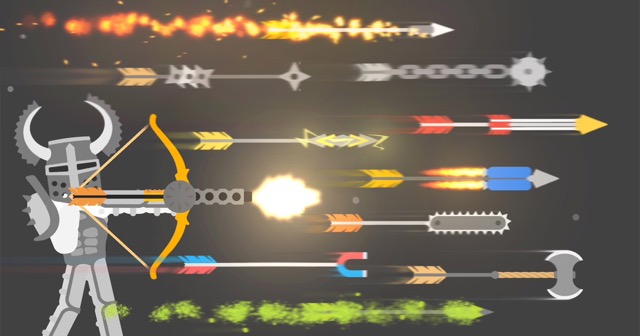
Ragdoll Archers combines bow combat with a character whose balance and movement respond to physics. Enemies vary in armor, position, and size, and defeating them earns skulls that support upgrades. Arrow choices provide another way to approach a difficult opponent instead of repeating one ordinary shot.
Recovery is also an aiming task. Flying red apples restore health, green apples replenish stamina, and golden apples provide both. A useful target is therefore not always an enemy. Compare the pressure on the archer with the resource you need, then choose whether the next arrow should remove a threat or support continued survival. Solo, local PvP, and cooperative play also use different control layouts.
How to Play Ragdoll Archers
Survive the arrow encounters, earn skulls, and recover the health or stamina needed to keep fighting.
- Choose solo, local PvP, or cooperative play and read the matching bindings.
- Inspect the nearest enemy's armor and position before aiming the bow.
- Shoot a useful recovery apple when health or stamina becomes the limiting resource.
- Spend earned skulls on relevant improvements and inspect newly available arrow types.
Controls & Timing
Apple colors separate resources
Red replenishes health, green replenishes stamina, and gold provides both. Choose by need instead of treating every flying pickup as the same reward.
Control layouts follow the mode
Solo uses the mouse and Space, while the two-player layouts split control between keyboard sides. A familiar input from one mode may not perform the same role in another.
Controls
| Input | Action | When to use |
|---|---|---|
| Left mouse button, solo | Control archer | Aim and act in single-player play. |
| Space, solo | Jump | Adjust the solo archer's movement. |
| WASD, player 1 | Control archer | Use the first side in two-player play. |
| Left Shift, player 1 | Jump | Move the first archer vertically. |
| Arrow keys, player 2 | Control archer | Use the second side in two-player play. |
| Right Shift, player 2 | Jump | Move the second archer vertically. |
High Score Tips
- Target the missing resource. Choose a green apple when stamina is the problem rather than spending attention on health recovery that does not fix the immediate limit.
- Read armor before repeating the shot. A protected target may need another angle or ammunition choice. Diagnose the obstacle before treating every failed impact as poor aim.
- Watch balance during a jump. The archer's physics affect the next firing position. Avoid adding another movement before understanding the current landing.
- Upgrade the recurring weakness. If stamina repeatedly interrupts attacks, compare that upgrade with damage. Skull spending should address the point where the run becomes unmanageable.
Key Features
- Recovery through archery: Apples turn resource management into a target choice.
- Ragdoll balance: Movement changes the position from which arrows are fired.
- Skull upgrades: Defeated enemies fund ability improvements.
- Local PvP and co-op: Different modes change both opposition and bindings.
Frequently Asked Questions
Which apple should I shoot?
Red restores health, green restores stamina, and gold restores both. Judge the next apple by the resource you need rather than only by which one is easiest to see.
Are the solo and two-player controls identical?
No. Solo uses mouse control and Space to jump. Two-player play assigns WASD and left Shift to one side, arrows and right Shift to the other.
What are skulls for?
They fund upgrades such as health, stamina, and damage. Compare the available improvement with the reason the previous attempt struggled before spending the reward.
What changes against an armored enemy?
The protected area and firing angle matter. Inspect where the arrow can land effectively and consider the available ammunition instead of repeating an unchanged blocked shot.