


Quick Controls
- WASD → Move. Approach the next firing line.
- Mouse movement → Aim; left-click → Shoot. Commit after identifying the opponent.
- Shift → Crouch. Use the posture action instead of expecting a sprint.
High Score Tips
- Check the currently selected match before choosing a target order.
- Use crouch with suitable geometry instead of treating it as universal cover.
- Learn the opening firing line before changing several settings at once.
Choose a weapon class, score eliminations in Free For All, or hold the point with teammates in Hardpoint.
- Classification
- FPS
About Deadshot.io
Deadshot.io is an online FPS with weapon-specific classes and more than one scoring task. Free For All rewards eliminations during the timed match, while Hardpoint asks a team to control a location. Choosing the class and recognizing the objective are separate preparation decisions.
Hardpoint changes the value of a position: being useful to the team includes contributing to control of the point, not just chasing opponents at the edge of the map. A class with a different weapon also asks for another engagement distance. Read the selected role before choosing the opening route, and keep the task in mind when the first opponent appears.

How to Play Deadshot.io
Score under the active mode: eliminate opponents in Free For All or help control the location in Hardpoint.
- Choose a weapon class and read the selected match objective.
- In Free For All, find a manageable engagement; in Hardpoint, approach a position that contributes to point control.
- Aim with the mouse and left-click to shoot, using the class weapon deliberately.
- Reload with R during a suitable interval and reconsider the route as the clock or point situation changes.
Controls & Timing
Class choice precedes distance
Each class uses a particular weapon. Select the opening after recognizing that role rather than forcing every choice through the same approach.
Hardpoint changes contribution
Controlling the location matters alongside eliminating opponents. A chase can take a player away from the area the team needs occupied.
Controls
| Input | Action | When to use |
|---|---|---|
| WASD | Move | Approach a readable firing position. |
| Mouse movement | Aim | Inspect and align an opponent. |
| Left mouse button | Shoot | Fire during the exchange. |
| R | Reload | Prepare the class weapon during a gap. |
| Shift | Crouch | Lower posture around suitable scenery. |
| Space | Jump | Change height when it serves the route. |
High Score Tips
- Choose the class before the route. A weapon-specific role is easier to use when the first engagement distance suits it.
- Read point occupancy in Hardpoint. Support the location that produces team progress rather than treating every elimination elsewhere as equivalent.
- Keep match conditions similar when comparing classes. A mode change can explain a result more than the equipment itself.
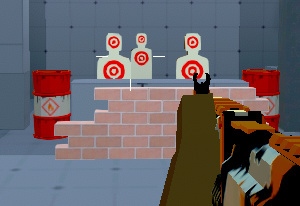
- Use posture with actual cover. Shift crouches, but scenery still determines whether that lower position screens the relevant line.
Key Features
- Weapon-specific classes: Selection changes the combat role.
- Free For All: Timed eliminations provide an individual task.
- Hardpoint: Team control of a location changes positioning priorities.
- Reload and posture: Preparation and crouching use separate controls.
Frequently Asked Questions
Does Shift sprint?
Shift crouches. Use it to lower your position at a chosen angle, then keep the objective and the next route in view.
What changes in Hardpoint?
The team needs control of a point. Keep that location in the plan rather than pursuing every opponent away from it.
Should every class use the same opening?
Classes have different weapons, so choose a route and distance that fit the selected role instead of treating the selection as appearance alone.
What should I watch after firing?
Watch the opponent and the result of the shot. If another attack is needed, settle the aim again and keep enough room to reload or move into cover.