



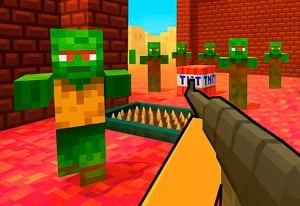
Quick Controls
- WASD → Move; Space → Jump. Keep a useful relationship with the teammate.
- Left-click → Shoot; right-click → Aim. Engage the opposing pair.
- Z / X / C / V → Build; G → Edit. Change protection during combat.
High Score Tips
- Place cover that leaves the teammate a usable route.
- Read a daily or weekly objective before deciding what reward to pursue.
- Check which numbered slot is active after changing from building to shooting.
Build protection while fighting beside a teammate, then use mission rewards to develop the loadout and appearance collection.
- Classification
- Shooter
About 2v2.io
2v2.io combines paired combat with rapid construction. You can place protection while an exchange develops, then use edits and weapon selection to create the next shot. The teammate's position matters because a useful wall should not unnecessarily disconnect the pair or block the route both need.
The menu adds progression through missions, currency, equipment, and appearance items. Daily and weekly tasks differ from lifetime achievements, while the inventory organizes owned skins and accessories. Keep those menu decisions separate from the immediate combat task: recognize whether an option changes the available weapon or only the look, then return to the match with a clear build-to-shot sequence.

How to Play 2v2.io
Help the pair survive and defeat its opposition by connecting team position, construction, and weapon use.
- Read the active match and recognize the equipped weapon and build bindings.
- Move with the teammate and place a useful structure when protection or height is needed.
- Use G to edit and return to a known numbered weapon slot for the shot.
- After play, inspect the relevant mission rewards and distinguish equipment choices from appearance items.
Controls & Timing
Construction must leave a next action
A wall provides protection only as part of a usable position. Consider how the pair will move or shoot after placing it.
Mission categories track different progress
Daily, weekly, and lifetime tasks have different horizons. Read the current goal before assuming one completed action fulfills every category.
Controls
| Input | Action | When to use |
|---|---|---|
| WASD / Space | Move / jump | Position with the teammate. |
| Left mouse button | Shoot | Engage with the selected weapon. |
| Right mouse button | Aim | Refine a chosen shot. |
| Z / X / C / V | Build | Select the displayed construction option. |
| G | Edit build | Change an existing structure. |
| 1–0 | Slots | Select the current equipment option. |
| R | Reload | Prepare the selected gun. |
| Enter | Chat | Communicate within the session. |
High Score Tips
- Build for the pair's next position. Leave an exit and useful view for the teammate as well as yourself. A wall that isolates the pair can trade one problem for another.
- Recognize the weapon after an edit. Returning to a familiar slot reduces confusion between the building action and the next combat input.
- Choose a mission with a visible purpose. Read the goal and reward category before pursuing it so progress is directed rather than based on an assumed payout.
- Read shop effects individually. A weapon option, character appearance, hat, and back accessory do not all serve the same function. Avoid treating a cosmetic price as a combat upgrade.
Key Features
- Paired build-and-fight play: Construction happens within an active team exchange.
- Edit controls: A placed structure can be changed for the next action.
- Mission categories: Daily, weekly, and lifetime progress provide separate goals.
- Inventory collection: Owned appearance items are organized outside the match.
Frequently Asked Questions
Is 2v2.io a football game?
No. 2v2.io pairs building and shooting in team combat. Use construction pieces to protect a position while coordinating attacks with your teammate.
Which key edits a build?
Use G to edit and Z/X/C/V to select construction pieces. Learn the current piece mapping before expecting the same arrangement as another building shooter.
Are all shop items combat upgrades?
No such assumption is useful. Read whether the option is a weapon, appearance item, or accessory before judging what it changes in the match.
Why think about the teammate when placing a wall?
Protection affects shared routes and sightlines. A useful structure should help the next team action rather than leaving one player unable to move or contribute.